

Inside Modern Online Impersonation and Email Scams
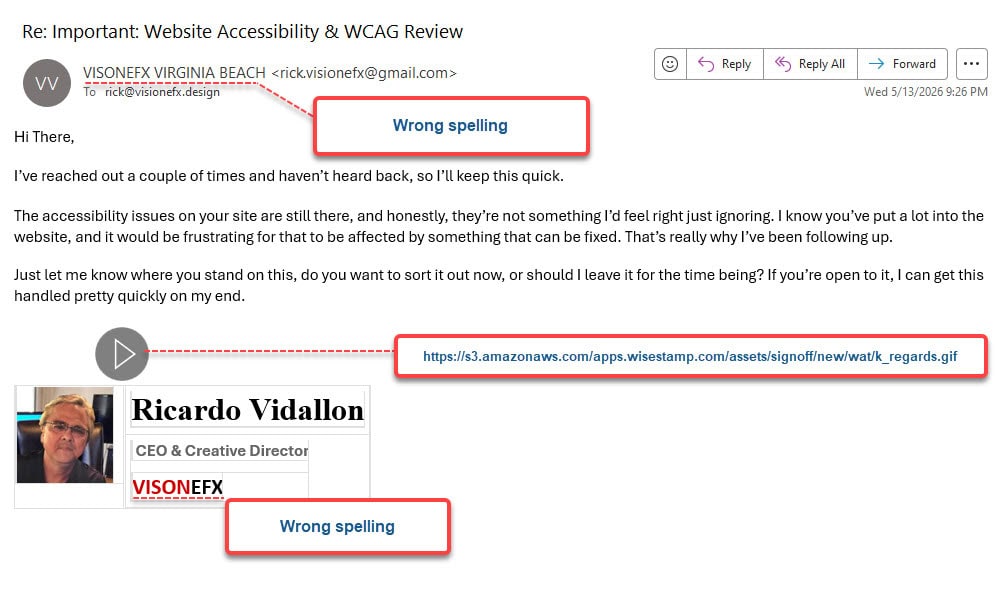
A few weeks ago, a website client reached out to ask whether an email they received from “me” was legitimate. It turns out someone is actively impersonating me using a lookalike email address and a photo of me pasted into an email.
Furthermore, this person is contacting my clients, attempting to phish for clicks or responses. I reported the fraudulent email to Gmail and the clickable GIF to AWS Web Services. However, beyond that, there is nothing more I can do. This type of impersonation scheme is similar to when someone creates a Facebook or other social network account using your name and photo.
IMPORTANT: If you receive an email ‘like the one seen below’, please delete it immediately. I do not solicit services via email without first speaking with my clients directly by phone.
More About Bad Actors Who Construct Digital Clones
When a bad actor constructs a digital clone of a trusted CEO, business partner, or name-brand software platform, they are specifically hacking into your system using human psychology.
1. The Anatomy of Modern Email Impersonation
Email remains the primary battleground for online impersonation. For example, attackers generally rely on three main methodologies to trick recipients into believing they are communicating with someone they trust.
A. Lookalike Domains or Emails (Typo-squatting)
Instead of hacking an actual email account, scammers register a domain name that is visually nearly identical to a legitimate business domain. At a glance, the human eye automatically corrects minor discrepancies, allowing the scammer to slip through a victim’s mental guardrails.
- Character Substitution: Swapping a lowercase l for a number 1, or an m for an rn (e.g., exarnple.com instead of example.com.
- Extension Tweak: Changing a reputable.com domain to a .net, .co, or a free webmail variation.
- The Deceptive Sender Display: Attackers often use a completely generic free webmail account (like a standard Gmail address) but manually alter the Display Name to match an executive or a business partner. On mobile email clients, where the underlying email address is often hidden behind the display name, this tactic is highly effective.
B. Business Email Compromise (BEC) and Vendor Fraud
Vendor Email Compromise represents one of the most financially devastating forms of impersonation. In this scenario, attackers compromise a real, legitimate business account—often a vendor or supplier—by stealing credentials through separate phishing campaigns.
Once inside, the attacker does not immediately strike. They quietly monitor the email threads, learning the company’s tone, billing cycles, and ongoing projects. At a critical moment—such as when a large invoice is due—the attacker interjects from the real compromised account or a perfectly timed lookalike email.
They issue an urgent update, claiming that due to an “immediate audit” or “banking shift,” the payment details have changed. Because the email references authentic project details and names, finance teams frequently route thousands of dollars directly into fraudulent accounts before the deception is realized.
C. Clone Phishing
In a clone phishing attack, an attacker intercepts or copies a previously delivered, completely legitimate email containing an attachment or link. The criminal recreates an identical version of the email, replacing the safe link or file with a malicious one (such as a credential-harvesting landing page or malware). The email is then sent from a spoofed address, claiming to be a “re-send” or an “updated version” of the original file.
2. Breaking the Script: Beyond the Inbox
While email is the anchor, modern impersonation campaigns rarely stop there. To build maximum credibility, threat actors deploy multi-channel social engineering tactics.
AI-Driven Phishing and Deepfakes
The days of identifying scams by scanning for poor grammar and obvious spelling mistakes are largely over. Attackers now leverage generative AI to write flawlessly professional, highly tailored messages that perfectly mimic corporate communications.
Furthermore, AI voice cloning and deepfake video technology have elevated executive impersonation to alarming heights. Using only a few seconds of audio scraped from public videos, webinars, or social media, scammers can generate a synthetic clone of a business leader’s voice.
They then launch a multi-layered attack: an urgent email demanding a financial transfer is quickly followed by a phone call or a Microsoft Teams/Slack voice note from the “CEO,” which sounds entirely authentic, to pressure a subordinate to bypass traditional security protocols.
Quishing (QR Code Phishing)
With QR codes deeply integrated into standard business operations, digital menus, and shipping labels, attackers have turned them into a powerful weapon. By embedding a malicious QR code inside an email—frequently disguised as a mandatory Microsoft 365 re-authentication alert or an IT security update—attackers bypass standard email filters.
Because email security software scans text and links but doesn’t always parse the destination hidden inside an embedded image, the email lands safely in the user’s inbox. When scanned via a mobile phone, it redirects the employee to a fake login portal designed to harvest corporate credentials in real time.
3. The Psychological Playbook: Why Scams Succeed
Technological execution is only half the battle; the true engine of an impersonation scam is human emotion. Attackers construct their pretexts around specific psychological triggers:
- Urgency: “Action required within 2 hours,” “Overdue invoice,” or “Account suspension imminent.” Urgency forces the brain to panic, causing victims to bypass standard verification protocols.
- Authority: Impersonating a CEO, CFO, or a government agency like the IRS. Employees are naturally conditioned to comply quickly with requests originating from leadership.
- Helpfulness / Fear of Conflict: Exploiting an employee’s desire to please their boss or resolve a client crisis quickly, blocking the instinct to push back or question the request.
4. Building a Bulletproof Defense
Defending an organization or protecting clients from sophisticated impersonation requires a combination of technical configurations and firm operational policies.
Technical Safeguards: The Email Authentication Triad
Relying entirely on employee vigilance is an unstable security strategy. Implementation of core domain security protocols is the critical first line of defense to stop spoofing at the server level:
- SPF (Sender Policy Framework): Acts as a public directory of authorized IP addresses and servers allowed to send mail on behalf of your domain.
- DKIM (DomainKeys Identified Mail): Attaches a unique cryptographic digital signature to every outgoing email, ensuring that the message was not altered or intercepted in transit.
- DMARC (Domain-based Message Authentication, Reporting, and Conformance): Leverages both SPF and DKIM to instruct receiving mail servers on exactly how to handle an unauthenticated email. Setting a strict DMARC policy tells external mail servers to automatically quarantine or reject unauthorized emails that appear to be from your domain, helping keep your clients and brand reputation safe from lookalike spoofing.
Out-of-Band Verification Policies
The most effective organizational defense against impersonation is a rigid, mandatory out-of-band verification policy.
The Golden Rule of Digital Verification: If an email, text, or chat message requests a change to banking information, a wire transfer, or the release of sensitive credentials, verify it through a completely separate communication channel.
If the request arrives via email, confirm it by calling the person using a known, trusted phone number—never the phone number listed in the suspicious email signature. Similarly, if an unexpected Slack or Teams message arrives from an executive requesting a rapid change in protocol, verify it face-to-face or in an established voice channel.
Implementation of Multi-Factor Authentication (MFA)
Even if an employee falls victim to a convincing credential-harvesting page, robust Multi-Factor Authentication adds a vital secondary barrier. While attackers increasingly try to intercept MFA codes through sophisticated reverse-proxy phishing kits, enforcing hardware-based security keys or app-based push notifications drastically reduces the likelihood of an immediate account takeover.
Summary: Maintaining Digital Vigilance
Online impersonation succeeds when speed overrides caution. Moreover, artificial intelligence can make fake voices sound real and fraudulent emails read more personally.
Therefore, by hardening your technical infrastructure with SPF, DKIM, and DMARC, providing ongoing awareness training, and enforcing strict protocols for financial and digital assets, businesses can build an effective defense against digital impostors.