

AI Crawlers and Your robots.txt: Who’s Visiting Your Website — and Should You Let Them In?
Sooner or later, every website owner spots one in the logs: a visitor named GPTBot or ClaudeBot or OAI-SearchBot, quietly reading pages at three in the morning. Three questions follow. What is this thing? What’s it doing with my content? And should I block it?
Those questions matter more than any robots.txt decision has in twenty years, because these bots are the supply chain for AI answers.
Whether ChatGPT, Claude, Perplexity, Copilot, or Google’s AI Overviews can find and cite your business depends on which of them you let in — and one stale line in a text file can quietly remove you from the channel your competitors are growing in. Here’s the plain-English guide.
The Three Kinds of AI Bots (and Why the Difference Is Everything)
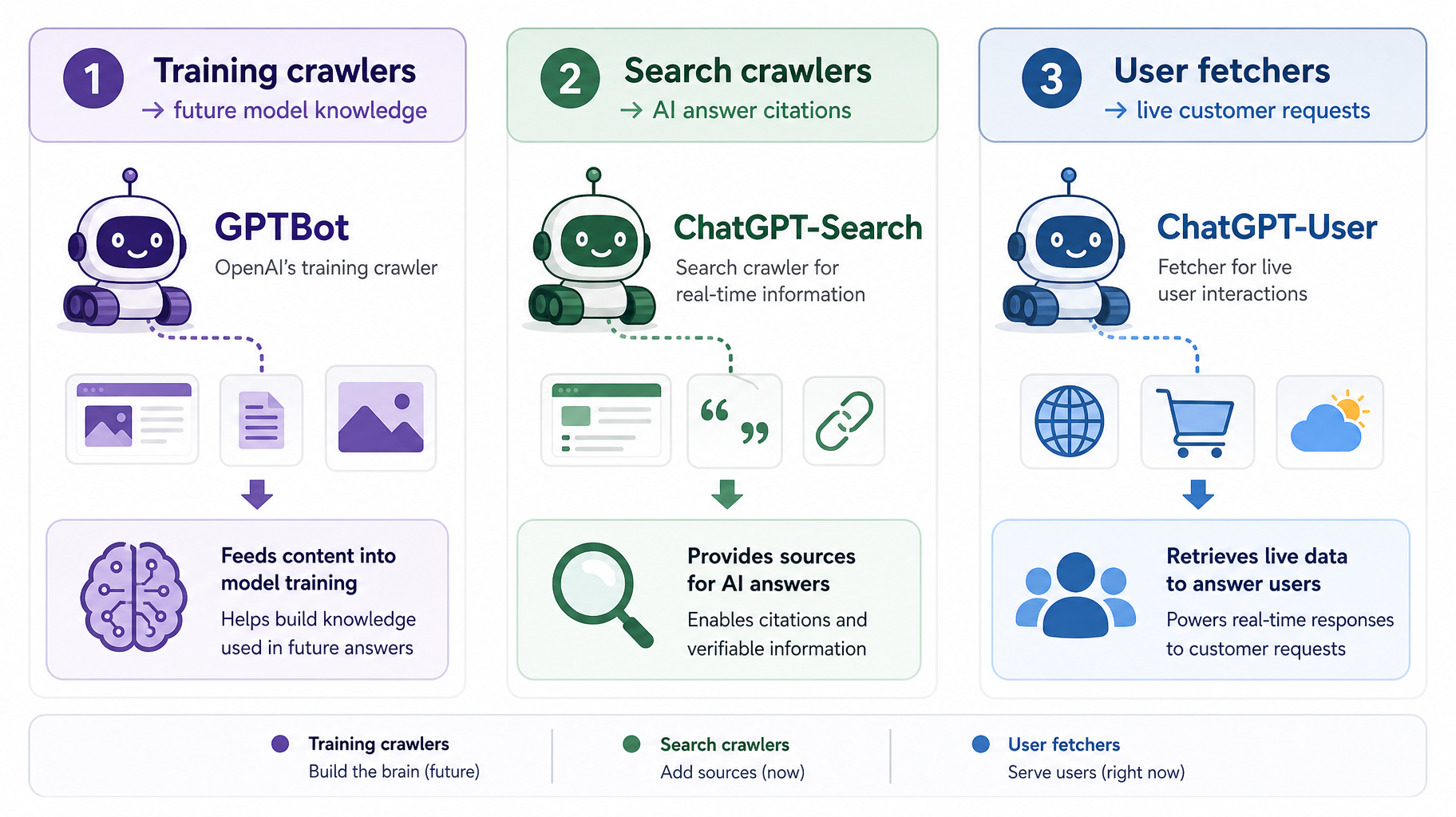 Most “block AI bots” advice treats every crawler the same. That’s the root mistake. AI companies run different bots for different jobs, and they carry very different consequences:
Training crawlers collect content to teach future AI models.
GPTBot (OpenAI), ClaudeBot (Anthropic), Meta-ExternalAgent, CCBot (Common Crawl), and Bytespider (ByteDance) live here. Blocking these keeps your content out of training datasets — a legitimate policy choice with relatively low visibility cost today.
Search and retrieval crawlers build the indexes AI assistants use to answer questions right now.
-
- OAI-SearchBot feeds ChatGPT search
- Claude-SearchBot feeds Claude
- PerplexityBot feeds Perplexity
And don’t forget: Bingbot feeds Copilot, and Googlebot feeds AI Overviews. Blocking these makes you invisible in AI answers. OpenAI’s own documentation spells it out: sites that block OAI-SearchBot will not appear in ChatGPT search results.
User-triggered fetchers grab a specific page when a real person asks about it.
ChatGPT-User, Claude-User, Perplexity-User. This is a customer, mid-conversation, asking an AI to look at your website. Providers often treat these as user-directed access rather than crawling, so they don’t always follow robots.txt the way automated bots do — but deliberately blocking them means slamming the door on an interested human.
Then two oddballs aren’t crawlers at all: Google-Extended and Applebot-Extended are control tokens. No bot by those names visits your site — the directives tell Google and Apple what they may do (AI training and grounding) with content their regular crawlers already fetched. Blocking Google-Extended does not touch Googlebot, your Google rankings, or AI Overviews.
The independence point matters too: within each company, every bot needs its own directive. Blocking ClaudeBot does nothing to Claude-SearchBot or Claude-User. There is no “block Anthropic” switch — robots.txt works bot by bot.
The Decision That Actually Matters: Search vs. Training
For a business that wants customers, the search-and-fetcher tier isn’t really a decision — blocking it is self-erasure from a growing, high-intent channel. The genuine decision is the training tier, and there’s a legitimate case on each side.
The case for blocking training bots is economics.
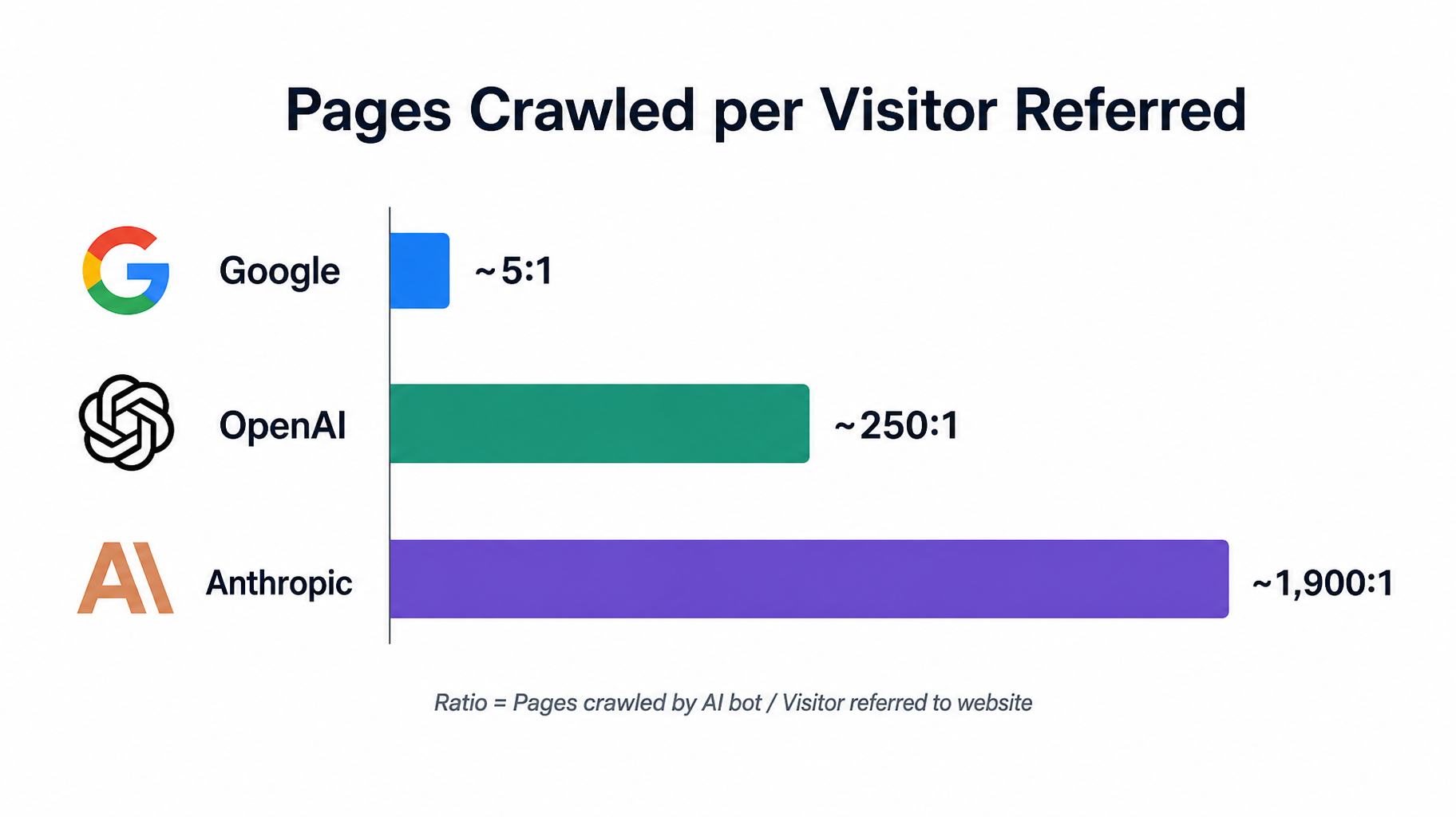
Analysis of crawler behavior in 2026 shows the extractive pattern plainly: by mid-year, Anthropic’s crawlers fetched on the order of 1,900 pages for every visitor referred back, and OpenAI’s about 250 — against roughly 5 pages per visitor for Google. If you’re a publisher whose content is the product, “read everything, send almost nobody” is a bad trade, and blocking training crawlers while allowing search crawlers captures most of the protection with little visibility cost.
The case for allowing them is subtler.
Training data is where AI models learn that your brand exists. An assistant’s baseline familiarity with your company — what it “knows” before it ever searches — comes from what it trained on. For a visibility business, being part of that knowledge has quiet long-term value that’s hard to measure and easy to forfeit.
Where has the market landed? Network-wide robots.txt analysis shows “block training, allow search” has become the visible consensus posture — though notably, by May 2026 GPTBot’s allow rate edged above its block rate for the first time, a sign the web is warming back up to training access.
Our honest guidance for most local and B2B service businesses: allow everything reputable, because you are not the New York Times — your content exists to make you findable, and every door you close is a customer who can’t walk through it. Reserve the training blocks for businesses whose content is the product.
The Mistakes That Quietly Erase You
This is the part we see go wrong in real audits — including, once, on our own site.
Your CDN may be blocking bots your robots.txt allows.
Research suggests roughly a quarter of business sites are accidentally blocking major AI crawlers at the CDN or firewall layer — often because someone clicked a well-meaning “block AI bots” toggle in Cloudflare or a security plugin two years ago. Your robots.txt can say “welcome” while your firewall says 403. Check both layers.
The group-precedence trap.
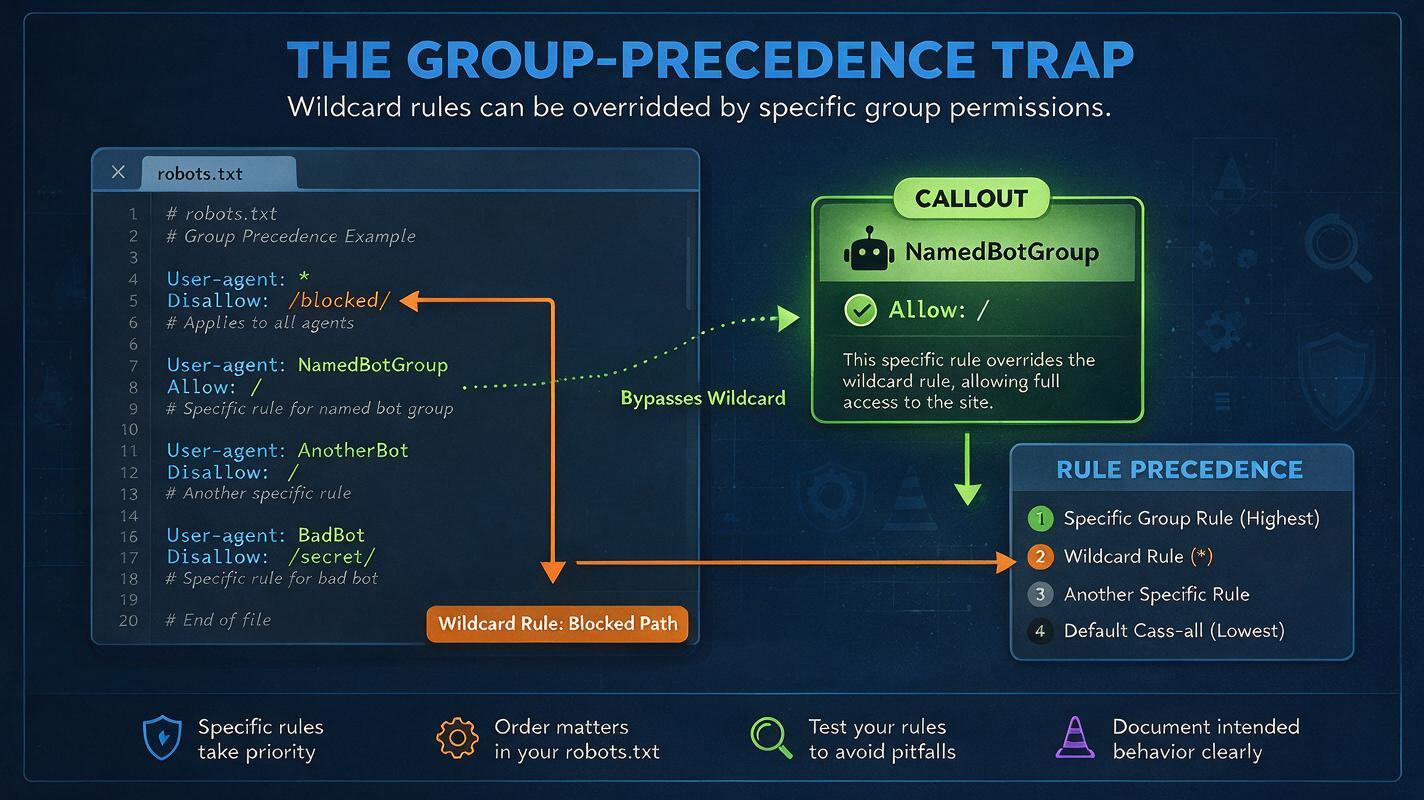
Here’s a robots.txt quirk that bit us on our own website: a bot follows only the most specific user-agent group that matches it — it does not inherit your `User-agent: *` rules. Add a friendly `User-agent: GPTBot / Allow: /` group, and GPTBot now ignores every Disallow you wrote under the wildcard, including things like your admin and cart paths. Any protections you want a named bot to follow must be repeated inside that bot’s own group. This one bug silently changes what half the internet’s copy-paste configs actually do.
The stale 2023 block list.
Early “block AI” tutorials predate the training/search split, so old configs often block OAI-SearchBot and other retrieval bots—written before anyone knew those bots would decide AI citations. If your robots.txt was last touched more than a year ago, it’s making decisions you never consciously made. New major bots appear several times a year; this file now deserves a quarterly review.
NOTE. Never block Googlebot or Bingbot thinking you’re blocking “AI” — you’d remove yourself from Google Search, Bing, Copilot, and the ChatGPT pipeline we covered previously in one stroke. The AI-specific tokens are Google-Extended and the bots listed above.
A Sensible Starter robots.txt
Here’s the visibility-first configuration we’d recommend for most businesses — explicit about every major bot, with sensitive paths repeated in each group because of the precedence rule above:
Regular search engines
User-agent: *
Disallow: /wp-admin/
AI search & retrieval: ALLOW (this is AI visibility)
User-agent: OAI-SearchBot
Disallow: /wp-admin/
User-agent: Claude-SearchBot
Disallow: /wp-admin/
User-agent: PerplexityBot
Disallow: /wp-admin/
User-triggered fetchers: ALLOW (these are customers)
User-agent: ChatGPT-User
Disallow: /wp-admin/
User-agent: Claude-User
Disallow: /wp-admin/
Training crawlers: your policy choice
# To allow (default visibility posture), omit these groups.
# To opt out of AI training instead, use:
# User-agent: GPTBot
# Disallow: /
# User-agent: ClaudeBot
# Disallow: /
# User-agent: Google-Extended
# Disallow: /
A “Disallow:” line with a path restricts only that path; a bare `Disallow: /` blocks the bot entirely. In WordPress, most SEO plugins let you edit robots.txt from the dashboard — no FTP required.
How to Check What’s Actually Happening
Your hosting stats (AWStats in cPanel) and Cloudflare’s bot analytics will show which AI user agents actually visit. Bing Webmaster Tools’ AI Performance report shows whether Copilot is citing you.
And because user-agent strings can be faked, OpenAI and Perplexity publish official IP ranges for verifying that “GPTBot” in your logs is really OpenAI. Fifteen minutes a quarter keeps the file honest — and remember, this is the gate; llms.txt, which we covered last time, is merely a guide with no blocking power at all.
FAQ
Does blocking GPTBot hurt my Google rankings?
No. GPTBot is OpenAI’s training crawler and has nothing to do with Googlebot or Google’s ranking systems. You can block GPTBot and Google-Extended without affecting Google Search visibility.
Can I appear in ChatGPT answers without letting OpenAI train on my content?
Yes — that’s exactly what the bot split enables. Block GPTBot (training) while allowing OAI-SearchBot (search index) and ChatGPT-User (live fetches), and you remain eligible for ChatGPT search citations while opting out of training datasets.
What does Google-Extended actually control?
It’s a control token, not a crawler. Disallowing it tells Google not to use your content for Gemini model training and grounding — but it doesn’t block any bot from visiting, and it has no effect on Googlebot, your rankings, or AI Overviews, which run on Google’s regular search index.
Do AI bots actually obey robots.txt?
The major companies’ documented bots — OpenAI’s, Anthropic’s, Google’s, Perplexity’s — state that they honor it, and log studies largely bear that out. But robots.txt is an honor system, not a lock: some scrapers ignore it, and user agents can be spoofed. For true enforcement, block at the server or CDN level using verified IP ranges.
Will blocking AI crawlers speed up my website?
Rarely in any way a visitor would notice — for most business sites, AI crawl load is modest. If a specific bot is genuinely hammering your server, rate-limit or block that one at the firewall rather than closing the door on the whole AI ecosystem.
The Bottom Line
Your robots.txt used to be a housekeeping file. In the AI era, it’s a distribution decision — a two-minute text edit that determines whether the assistants your customers ask can see you, cite you, and send you buyers.
The same posture for most businesses: welcome the search and user-triggered bots without exception, make a conscious choice about training crawlers, repeat your protections in every bot group, and audit the whole stack — file, plugin, CDN — a few times a year. The businesses losing this game aren’t losing on strategy. They’re losing to a toggle someone clicked in 2023 and forgot.
Want to know exactly which AI systems can see your site right now — and which ones you’re accidentally blocking? Request an AI crawler audit, and we’ll pull the logs.
References:
OpenAI crawler documentation
Anthropic crawler documentation
Google crawler documentation