

Your Website’s Leads Are Landing in Spam — Here’s Why, and Here’s the Fix
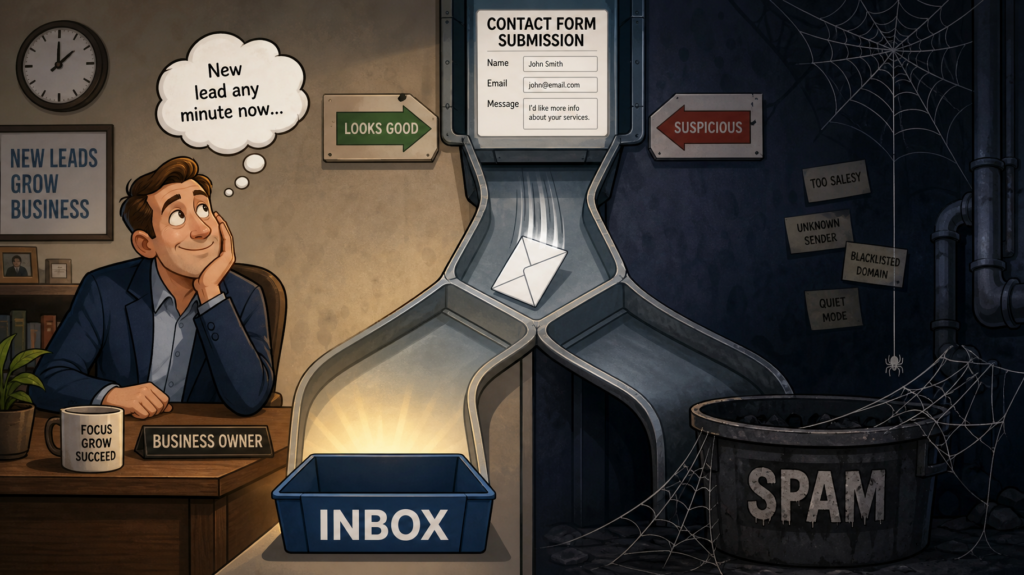
A special kind of business leak never shows up on any report: the lead that arrived and was never seen. The visitor filled out your contact form. The thank-you page fired. Somewhere, an email with their name, number, and project details was generated — and landed in your junk folder. Or worse, nowhere at all.
You can’t miss what you never saw so that this problem can run silently for months. We diagnose and fix it across client websites all the time, and the pattern is remarkably consistent — as is the fix. Here’s an easy-to-understand explanation of what’s going wrong and how to fix it for good.
How This Problem Announces Itself
 Three real patterns from our own email ticket queue, details anonymized.
A water treatment company on managed WordPress hosting noticed leads had gone quiet — the form “worked” in every test. Still, notifications had been silently failing for weeks because the web server was sending emails unauthenticated, and mailbox providers had stopped accepting them.
A professional services firm on Microsoft 365 had an even stranger version: form emails claiming to be from their own domain, arriving in their own domain, via a route Microsoft didn’t recognize—which looks exactly like spoofing, so Microsoft treated it accordingly.
And a home-services company had the subtle version: mail mostly arrived, but inconsistently, because their domain’s authentication records were incomplete — passing some checks, failing others, and living on the spam-folder borderline.
Different symptoms, one root cause: the emails your website sends are not proving they’re allowed to speak for your domain.
Why It Happens: Your Website Is an Unauthorized Sender
Out of the box, WordPress sends email the 2005 way: the web server itself fires off a message claiming to be from you. No authentication, no credentials — just a shared hosting server, often with a battered IP reputation, asserting “I’m yourbusiness.com, trust me.”
For years, mailbox providers grudgingly tolerated this. That era is over.
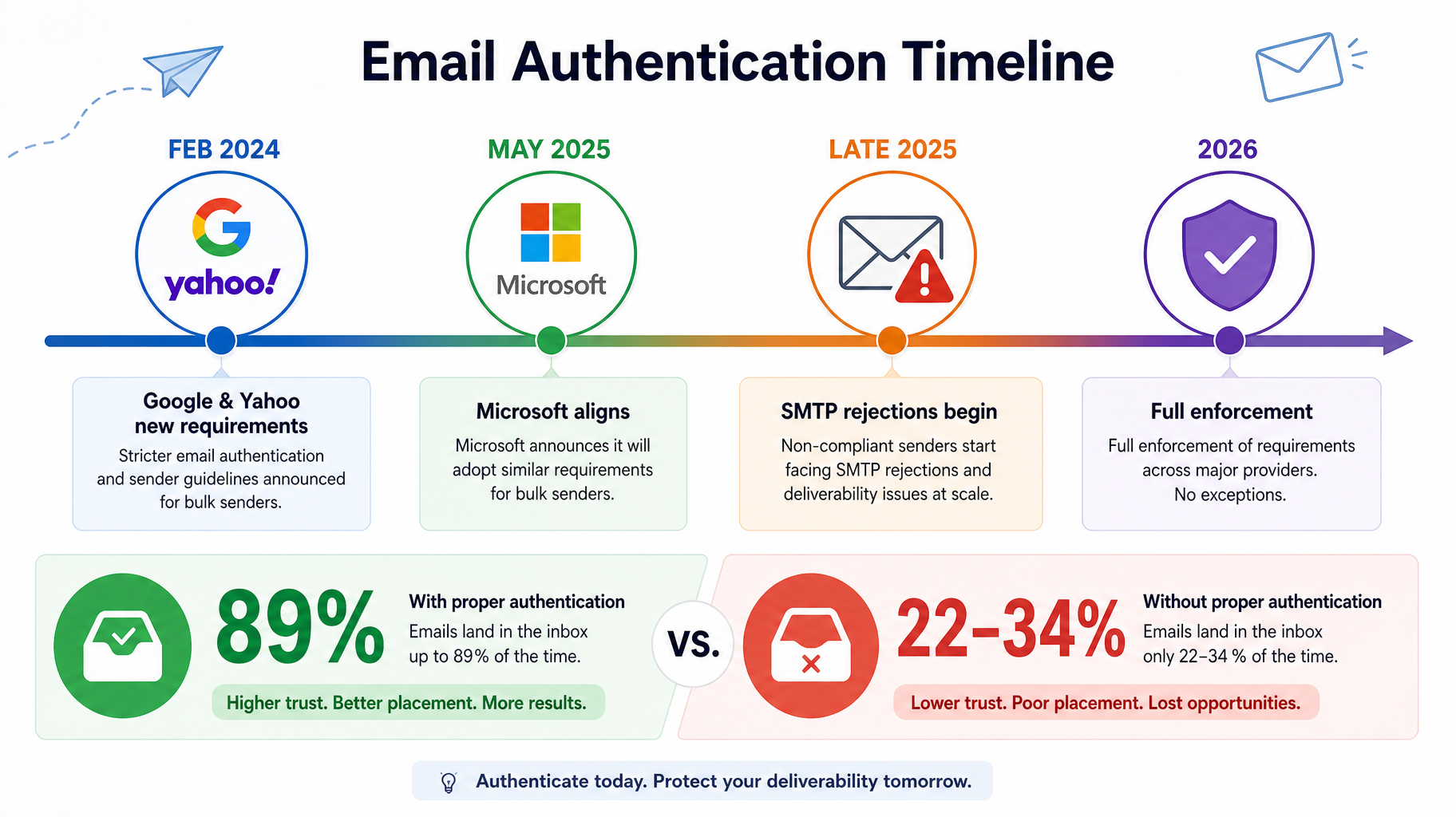
Google and Yahoo began enforcing authentication requirements in February 2024, and Microsoft followed with its own enforcement in May 2025. And this isn’t just a “bulk sender” issue—Google requires SPF or DKIM authentication from all senders, regardless of volume, and Yahoo requires both.
By late 2025, Google had escalated to rejecting non-compliant mail outright at the server level. As of mid-2026, enforcement is fully active across all three major providers, with permanent rejections for mail that fails the checks. A rejected email doesn’t go to spam. It goes nowhere.
The stakes gap is stark: compliant senders now average 89% inbox placement, while non-compliant senders see roughly a quarter to a third of their mail routed to spam. And there’s one more trap specific to contact forms: many are configured to send notifications “From” the visitor’s own email address.
Your web hosting server has no authority to send mail as someone’s Gmail address — that’s textbook spoofing — so those notifications fail authentication instantly, no matter how legitimate the inquiry.
SPF, DKIM, and DMARC in Plain English
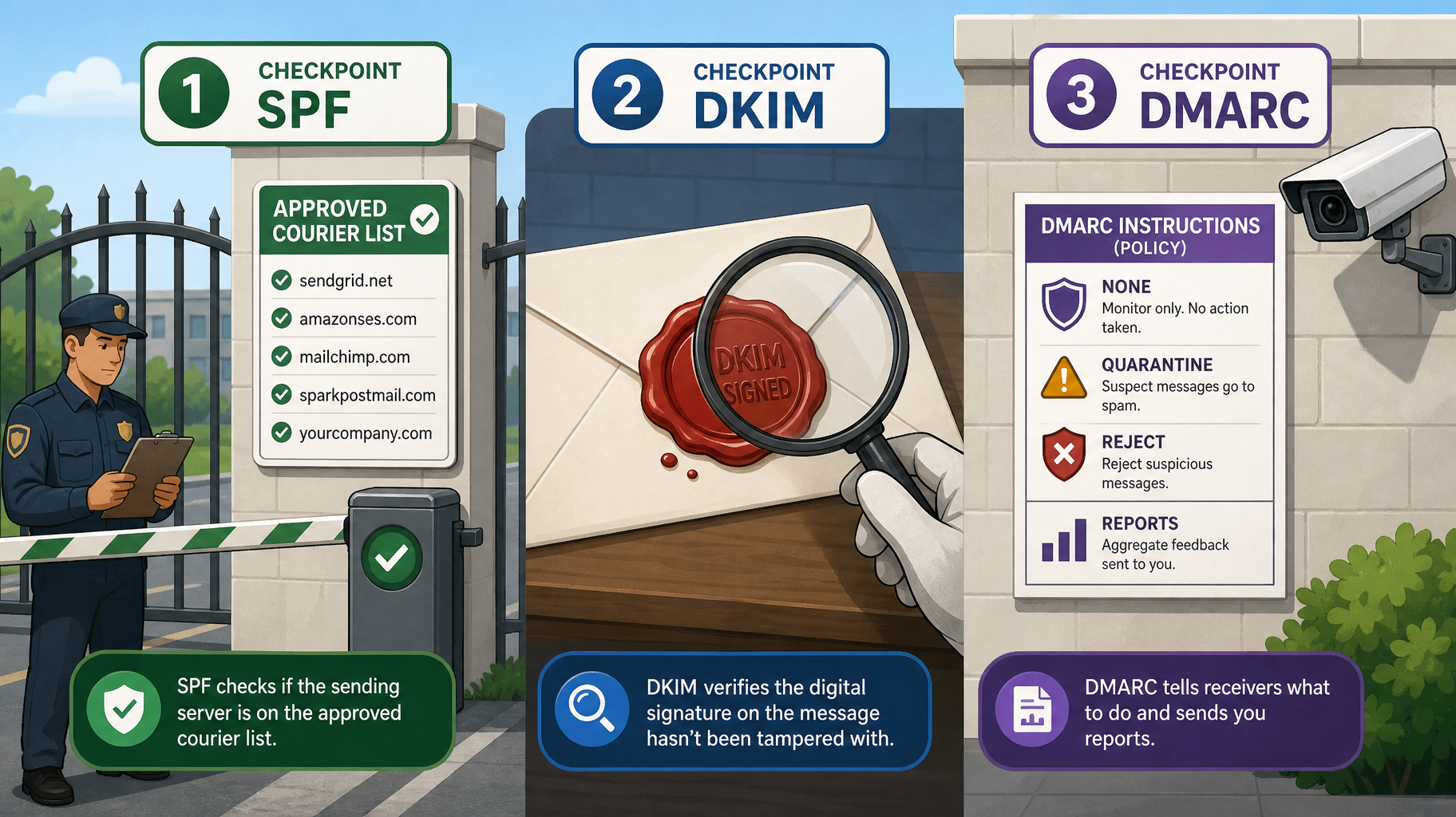
The fix rests on three DNS records that sound like alphabet soup but map to simple ideas.
SPF is the approved-courier list.
A record on your domain that says, “these specific servers are allowed to deliver mail on my behalf.” When your mail arrives from a server not on the list, receivers get suspicious.
DKIM is the tamper-proof wax seal.
Your legitimate mail gets cryptographically signed as it’s sent; the receiving server checks the seal against a public key on your domain. An intact seal proves the message really came from you and wasn’t altered in transit.
DMARC is your standing instructions — plus the surveillance footage.
It tells receiving servers what to do with mail that fails the first two checks (watch it, quarantine it, or reject it), and it sends you reports showing who’s sending mail as your domain — including the senders you forgot about and the impostors you didn’t know existed.
All three live as small text records in your DNS. None requires new software. Together they’re the difference between your leads walking in the front door and being stopped at the gate.
The Fix, Step by Step
Stop letting the web hosting server send your mail.
Install an SMTP plugin (WP Mail SMTP or similar) and route all site email through an authenticated service. For business sites, we typically deploy a transactional email service. SMTP2GO and SendLayer are two we use regularly—both deliver automated mail and provide logs to prove it.
Fix the From/Reply-To pattern in every form.
Notifications should come from an address on your own domain (forms@yourbusiness.com) with the visitor’s address in Reply-To. You lose nothing — hitting reply still reaches the customer — and you stop impersonating Gmail with every submission.
- Publish and verify SPF. Make sure it includes your mail provider and your new sending service. One domain gets one SPF record; multiple services get merged into it, not listed separately.
- Enable DKIM everywhere you send from. For example, your business mail platform (Google Workspace or Microsoft 365) and your transactional service each sign with their own keys. This was the exact gap in our home-services example above.
- Add a DMARC record and actually read the reports. Start at the monitoring policy (p=none) to see what’s passing and failing, fix what the reports reveal, then tighten to quarantine and ultimately reject. Parking at “none” forever is itself a trust signal providers notice — enforcement is the destination.
Test like a skeptic. Send form submissions to a Gmail, an Outlook, and a Yahoo address you control; check the spam folder, not just the inbox; run a message through a scoring tool like mail-tester. Then retest whenever you change hosts, DNS, or mail providers — this configuration rots silently.
Don’t Forget the Other Half: Email Your Customers Never See
Everything above applies to a second, quieter casualty: the messages your website sends to customers — form confirmations, quote follow-ups, appointment notices. When those land in spam, no lead is lost, but your business looks broken at the exact moment someone decided to trust it.
And the same three records govern your marketing newsletter; if you email your list, this fix protects that channel too. One afternoon of DNS work covers it all.
This is also, frankly, an argument for treating your website as infrastructure rather than a brochure — the same unglamorous-technical-work theme from our redesign article. The businesses that never lose a lead to this problem aren’t lucky; they’re maintained.
FAQ
My own test submissions arrive fine — so why do customers say they got no reply?
Because you’re the easiest recipient on earth: you expect the message, and your mailbox has seen your own domain forever. Real-world deliverability depends on strangers’ providers running full authentication checks. Test with fresh Gmail, Outlook, and Yahoo addresses — and check their spam folders — before declaring a form healthy.
Is installing an SMTP plugin enough?
It’s the right first move, but it only fixes how you send mail. If your SPF doesn’t include the new service, DKIM isn’t signing, or your forms still send “from” the visitor’s address, you’ve upgraded the courier while leaving the paperwork wrong. The plugin, the three DNS records, and the From/Reply-To fix make the complete repair.
What’s the difference between DMARC’s none, quarantine, and reject?
They’re the instructions you give receiving servers for mail that fails authentication: “none” means deliver it anyway but send me reports; “quarantine” means send it to spam; “reject” means refuse it entirely. Start at none to observe, fix what the reports surface, then tighten — reject is where impersonation of your domain actually stops.
Will this fix my email newsletter too?
The same SPF, DKIM, and DMARC records protect every channel that sends as your domain — you’ll add your newsletter platform to them alongside your transactional service. If you send real volume, the bulk-sender rules also require easy unsubscribes and a low complaint rate, but authentication is the foundation either way.
How do I find out if I’ve already lost leads to this?
Check the spam folder of whatever inbox receives your notifications. Also check your form plugin’s entries database. Most good form plugins store submissions even when the email fails. Comparing stored entries with emails received is often when a business discovers how long the leak has been running.
The Bottom Line
Your contact form is the most expensive email sender in your company — every message it sends is a lead you paid marketing dollars to generate. In the enforcement era, “it’s always worked” is no longer evidence that it’s working, and the failure mode isn’t a spam folder you can check but a rejection you’ll never see.
The complete fix is one focused afternoon: authenticated sending, a corrected From pattern, and three DNS records with the reports switched on.
Not sure whether your leads are arriving? Request a deliverability check — we’ll test your forms against the major providers, read your domain’s authentication records, and show you exactly what’s getting through ideally, before your next customer gives up and calls a competitor.